Fast at the counter
Barcode scanning, carts, cash, mobile money, room charging, and instant receipt printing right at the counter.
Riktek POS + Hotel is a unified, offline-first system built for retail shops, supermarkets, pharmacies, restaurants, hotels, and guest houses in Ghana. Complete access is available free of charge for Windows and Android.
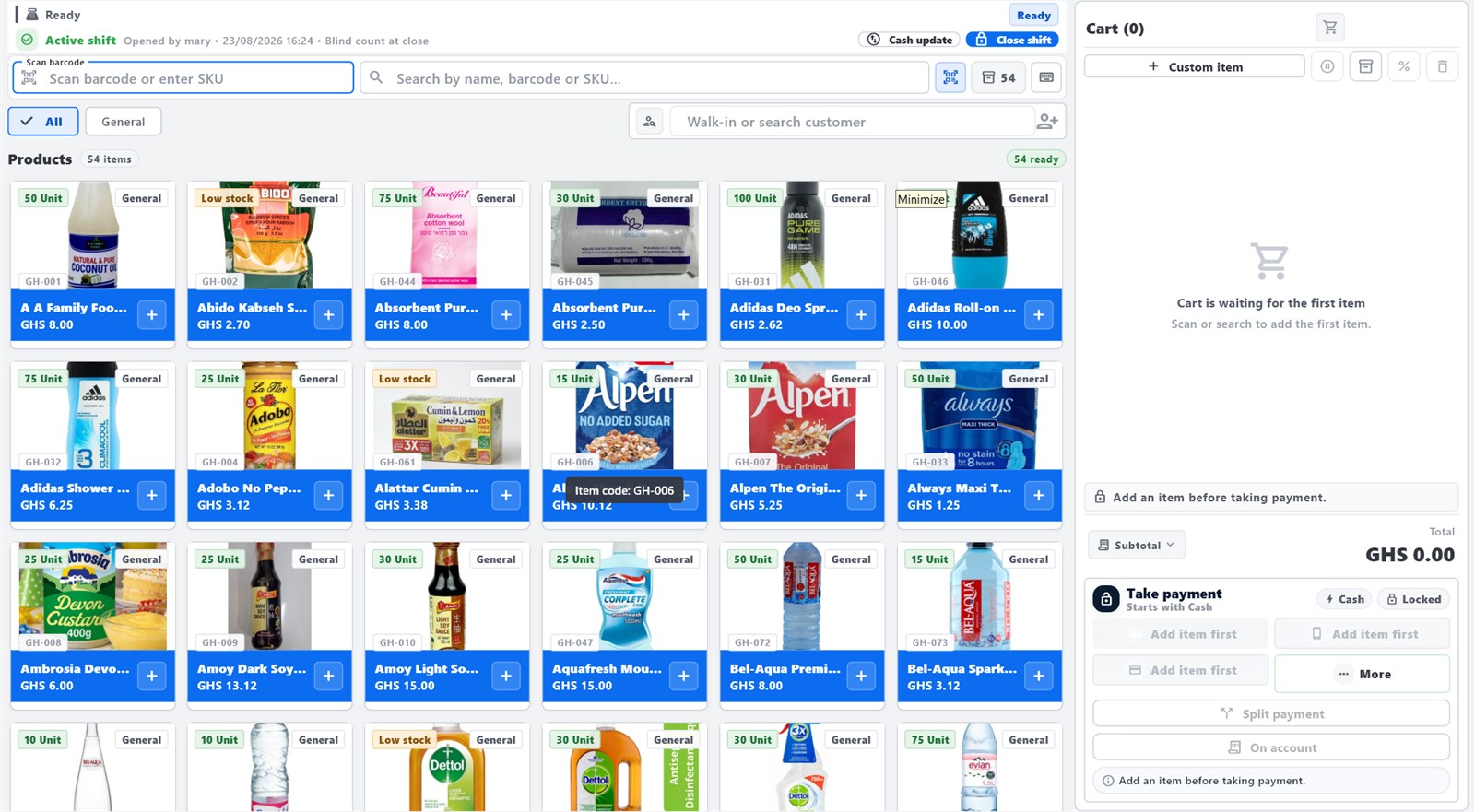
Barcode scanning, carts, cash, mobile money, room charging, and instant receipt printing right at the counter.
Accurate stock levels, inventory alerts, room bookings, guest folios, and housekeeping in one system.
Counter checkout and front desk operations remain 100% functional offline. Syncs automatically when internet returns.
Businesses joining our customer access programme receive the complete Riktek POS + Hotel platform for daily retail and hospitality operations. You can download and start operating immediately with no payment blocks.
Install Riktek POS + Hotel on your Windows PC counter or Android mobile device. Free of charge with no registration required.
Riktek POS + Hotel supports the everyday retail, hospitality, and service workflows of Ghanaian businesses.
Manage your accommodation front desk, guest rooms, reservations, and restaurant billing all within the same unified system.
Track room availability across standard, deluxe, and suite categories. Manage walk-ins, advance bookings, check-in dates, and expected departures with ease.
Every guest has a transparent folio tracking room charges, deposits, taxes, and incidental expenses. Issue itemized lodging receipts upon checkout.
Connect your dining and bar counters directly to guest rooms. Waiters and bartenders can charge food and drink tabs directly to the guest folio.
Monitor real-time room cleanliness — occupied, vacant, dirty, maintenance, or ready for check-in. Coordinate front desk and cleaning staff smoothly.
Every module is unlocked in the free customer access release. No feature locks, no payment screens, no expiration countdowns.
The checkout screen is designed for speed. Cashiers scan barcodes, select products, apply discounts with authorization, and complete sales with clear receipt generation.
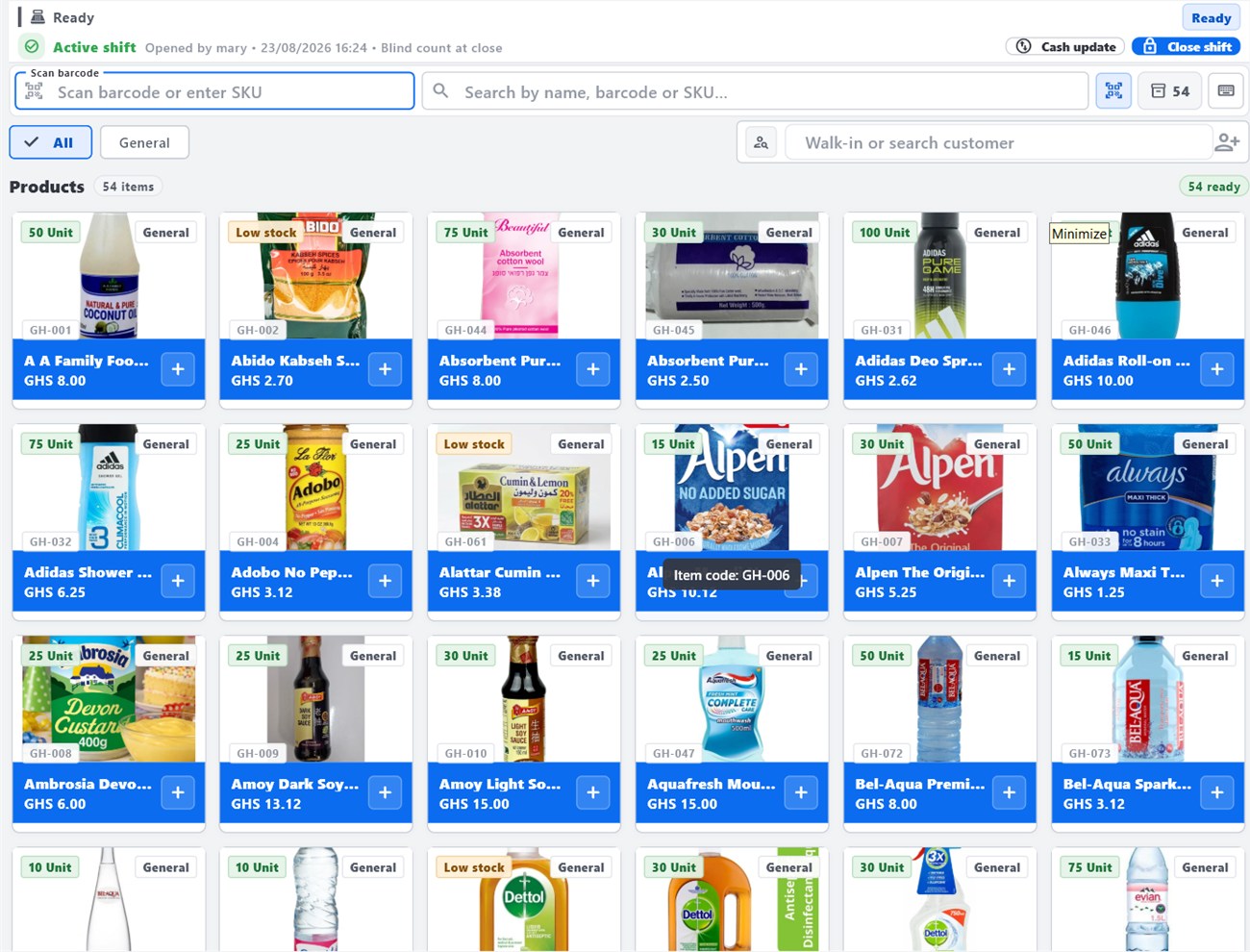
Prevent stockouts and lost revenue. Track product quantities automatically as items sell, manage purchase orders, and receive low-stock notifications.
Create separate accounts for cashiers, managers, and store owners. Set granular permissions so cashiers cannot alter prices without supervisor authorization.
Daily sales summaries, profit indicators, product performance, and tax reports help you make smarter purchasing and pricing decisions.
Record customer contacts, purchase history, and store credit. Build repeat customer relationships with personalized receipts.
Oversee your store, restaurant, or hotel through the browser management portal. Review reports and supervise staff from your laptop or phone.
Here is an overview of the core operational workspaces inside the Riktek POS + Hotel application.
Main selling workspace with live cart, barcode scanning, product catalogue, and payment tender options.
Product catalogue view with stock levels, cost pricing, selling prices, categories, and SKU barcodes.
Room availability calendar, check-in, guest folios, restaurant post-to-room, and night audit.
Daily shift closure, cash reconciliation, payment tender breakdown, and printable end-of-day reports.
Cashier PIN management, manager overrides, audit logs, and role-based security settings.
Thermal receipt printer configuration (USB/Network/Windows driver), header customization, and cash drawer trigger.
Internet in Ghana can fluctuate. Riktek POS + Hotel is built from the ground up so counter checkout and hotel guest management continue locally on your PC without pause.
Use any browser on your phone or laptop to access the Back Office dashboard. View sales reports, manage products, check hotel occupancy, and monitor store health remotely.
You can download and start using Riktek POS + Hotel today. Here is the recommended setup flow:
Download the Windows workstation or Android companion app directly from Riktek VPS.
Run the setup file on your Windows counter PC or install the APK on your Android device.
Enter your store or hotel name, currency (GHS), receipt header, and optional room/printer settings.
Add your items with prices and stock counts, or configure your hotel room categories and rates.
Ring up customers, record cash and mobile money sales, check in hotel guests, and print receipts.
Need setup assistance? Contact Riktek via WhatsApp (0546619477) for guided help anytime.
Approved Windows and Android releases are hosted directly on Riktek cloud infrastructure. Downloads are free and verified.
The primary offline-first workstation for Ghana retail counters and hotel front desks. Runs on any Windows 10 or 11 PC.
⬇ Download Windows installerThe signed POS & Hotel companion app for managers, waiters, and mobile sales workflows on Android smartphones and POS terminals.
⬇ Download Android APKYou do not need to register to download and use Riktek POS + Hotel. However, if you would like personal assistance setting up your products, configuring hotel rooms, setting up receipt printers, or onboarding your team, reach out to us directly!
Fill in this quick form and we will reach out directly via WhatsApp to assist your business.
Opening WhatsApp to send your message to Riktek support. We will reply promptly.
Answers to common questions from Ghanaian business owners.
Yes. Riktek POS + Hotel is available free of charge for businesses joining the customer access programme. You receive full, unrestricted access to both POS and Hotel Management with no hidden charges.
No. You can click Download and install the app immediately on Windows or Android. If you need help importing products, setting up hotel rooms, or configuring receipt printers, contact us via WhatsApp (0546619477).
Yes! Riktek POS + Hotel is specifically designed to handle both. You can manage your retail or restaurant checkout while simultaneously managing room reservations, guest check-in, and posting food/drink tabs to guest rooms.
Yes! Offline operation is a core feature. Counter checkout, room check-in, and receipt printing work 100% locally without internet. Data syncs automatically when connection returns.
Any standard Windows PC or laptop running Windows 10 or 11, or an Android phone/tablet. It supports standard USB barcode scanners, thermal receipt printers, and cash drawers.
Contact Riktek directly at 0546619477 (Call or WhatsApp) or email riktek2023@gmail.com for guided setup assistance.
Download Riktek POS + Hotel now for free on Windows or Android, or chat with us on WhatsApp at 0546619477 for onboarding assistance.